
The Users section is available only to Admin-level users and is the control center for managing access to the system. This is where admins can create, edit, or delete users and assign roles such as Admin, Dispatch, or Editor.
🔎 User List Overview
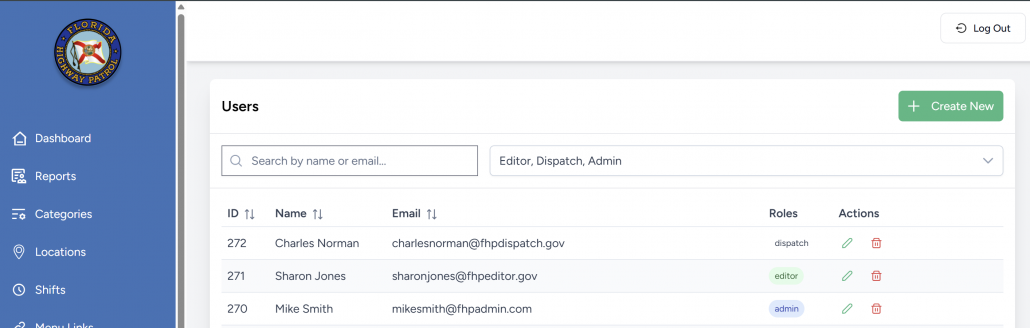
The user list table shows a full directory of all users in the system, including:
| Column | Description |
|---|---|
| ID | Internal unique identifier for each user. |
| Name | Full name or label for the user. |
| User’s login email. | |
| Roles | Displays the assigned role: admin, dispatch, or editor. |
| Actions | Options to edit (✏️) or delete (🗑️) the user. |
Search and filter tools are available at the top:
- Search bar: Filter users by name or email.
- Role filter dropdown: View only specific user types (Admin, Editor, Dispatch).
➕ Creating a New User
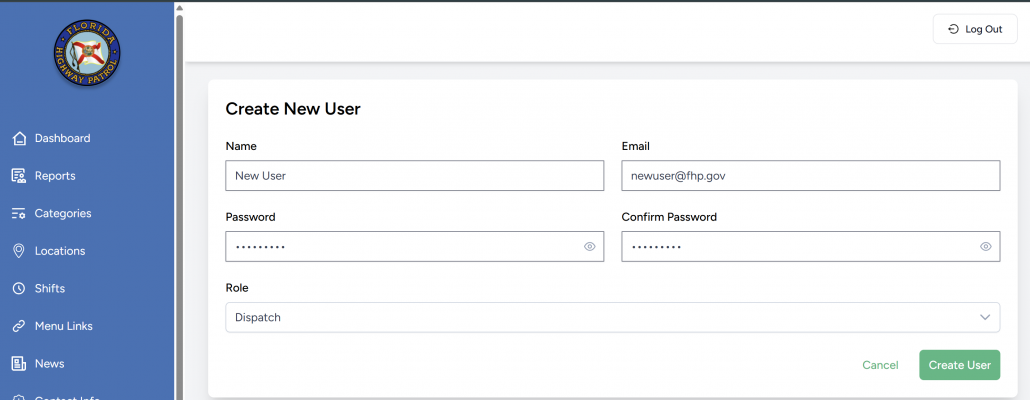
Clicking “Create New” opens the user creation form.
Required Fields:
- Name: Full name or label.
- Email: Must be unique and valid.
- Password: Must meet security standards (TBD).
- Confirm Password: Must match the entry above.
- Role: Must be one of the following:
- Admin: Full system privileges.
- Dispatch: Limited to tip handling.
- Editor: Limited to news and content.
- (Optional placeholder) External User – likely unused or for future expansion.
Buttons:
- ✅ Create User: Finalizes creation if validation passes.
- ❌ Cancel: Closes the form without saving.
📝 Editing a User
Clicking the ✏️ icon in the Actions column opens the Edit User form.
Editable fields:
- Name
- Password (leave blank to retain current password)
- Role
After edits:
- Click Update User to save changes.
- Click Cancel to exit without saving.
🗑️ Deleting a User
Clicking the 🗑️ icon prompts a confirmation before permanently removing the user.
⚠️ Warning: This action is irreversible and removes login access. Only Admins can perform deletions.
👥 Role Definitions Recap
| Role | Access Areas |
|---|---|
| Admin | Full access to all features, including user management. |
| Dispatch | Tip inbox, categories, status changes, user messaging. |
| Editor | News, links, and content updates only. |
✅ Best Practices
- Always verify the email and role before creating or editing users.
- Avoid duplicate accounts; use the search tool to check first.
- Use strong passwords and never share accounts across roles.
- Consider disabling users instead of deleting them (if functionality is added later).