
Dashboard Overview (FHP Admin Panel)
The Dashboard is the first screen users see upon logging into the Florida Highway Patrol Admin Panel. It provides a live operational summary of incoming reports, grouped by volume, time period, and importance level. This view is designed to help Admins, Dispatchers, and Editors quickly assess activity and identify urgent items across the state.
🔐 Who Has Access?
- Admin: ✅ Full access
- Dispatch: ✅ Full access
- Editor: ✅ Full access
📊 Dashboard Components
1. Summary Cards (Top Row)
These numeric indicators show live counts of reports:
- Total Reports — Cumulative count of all reports submitted.
- This Week — Number of reports submitted in the last 7 days.
- Today — Reports submitted on the current day.
- Unviewed — Reports not yet opened or reviewed by any panel user.
- High Importance — Reports tagged with High Importance, usually needing urgent review or response.
2. Reports Map
An interactive map visualizing all geolocated reports from citizens.
- Color-coded by Importance Level:
- 🟥 Red = High Importance
- 🟨 Yellow = Medium Importance
- 🟩 Green = Low Importance
- Filter Controls (Top Right of Map):
- Date Range — Options like “Last 7 Days”, “Today”, or a custom range.
- Importance Level — View only High, Medium, or Low importance reports, or all.
- Reset — Clears all filters to return to the full view.
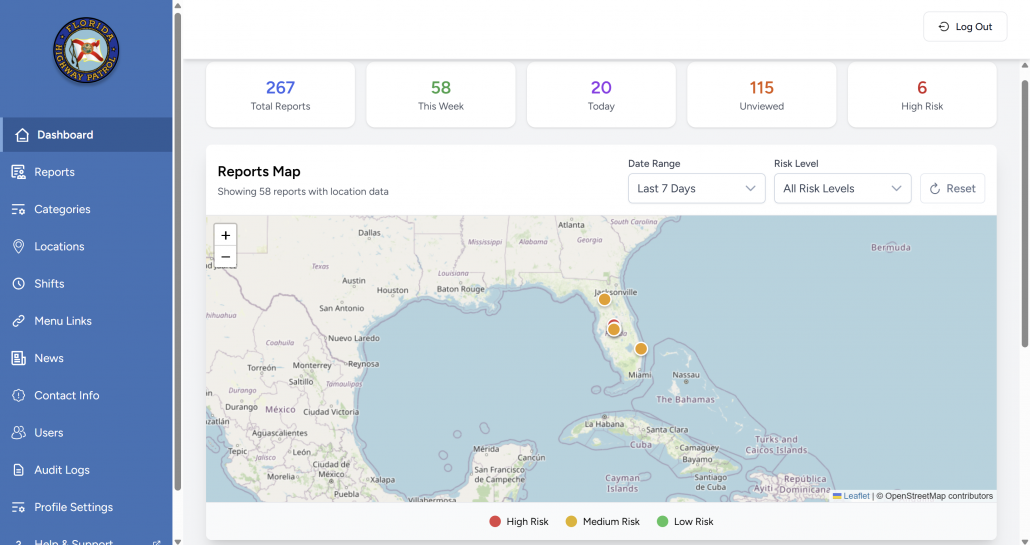
📌 Only reports that include geolocation are shown on the map.
3. Importance Panels (Bottom Section)
Reports are further grouped into three priority panels:
- High Importance Reports
- Displayed with a red background
- Often include emergencies or serious threats
- Medium Importance Reports
- Yellow background
- General incidents requiring attention
- Low Importance Reports
- Green background
- Informational submissions or minor concerns
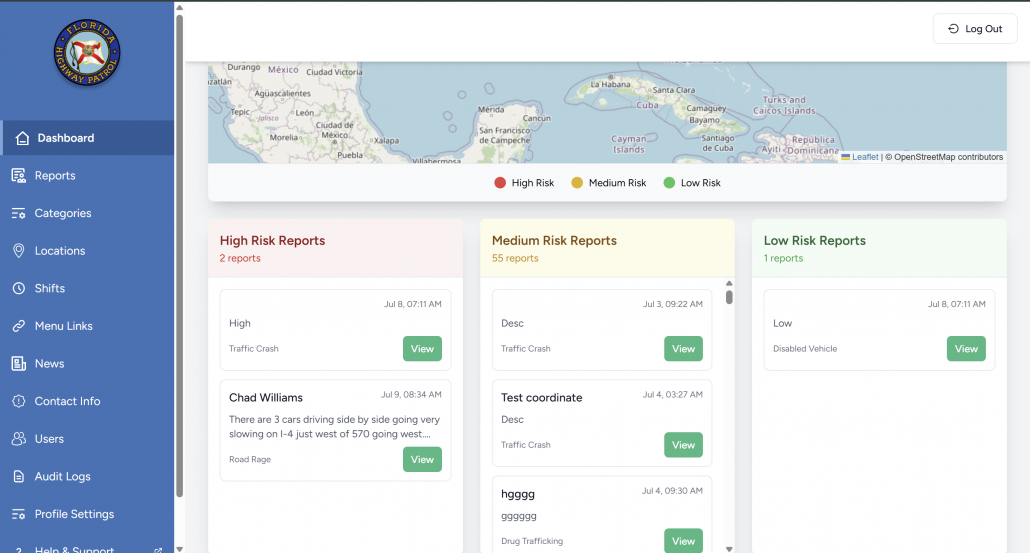
Each report listed includes:
- Title
- Time submitted
- Report type/category
- Preview text
- A “View” button to open full report details
🚓 Use Cases for Admins, Dispatchers & Editors
- Admins can monitor overall volume and respond to workload trends.
- Dispatch officers use this as a triage view for real-time response prioritization.
- Editors can reference trending categories or emerging topics for communications and news posts.
🛠 Pro Tips
- Check Unviewed first at the start of your shift.
- Use importance filters to reduce visual noise during busy hours.
- Hover over report markers on the map to preview category and location.